
Bible Homescreen - Read Now
Homescreen AppsBooks & Reference
4.5622.00 Reviews
- Version
- 1.6.5
- Installs
- 100.00K
- Age Rating
- Everyone 10+
Screenshots
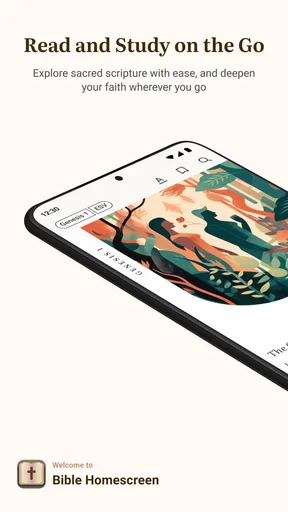
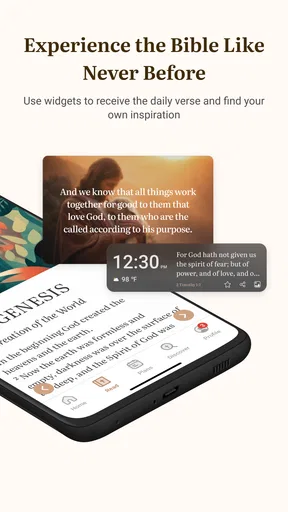
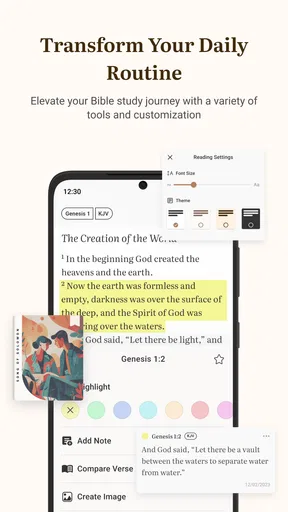
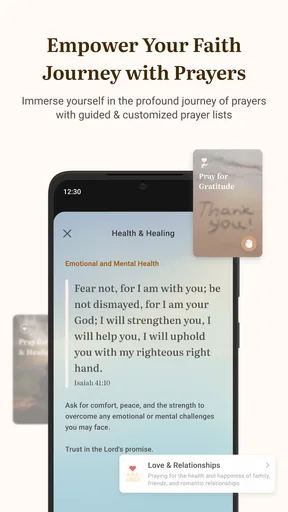
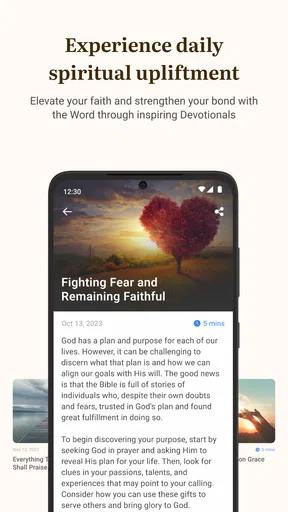
Our Review of Bible Homescreen - Read Now
 Analysis by Appyee
I approached Bible Homescreen - Read Now as a small change to my daily phone routine rather than as a conventional reading app. It comes from Homescreen Apps and sits in the Books & Reference category, with a simple purpose: keep the Bible close enough to encourage regular reading. That sounds familiar, but the homescreen focus gives it a different role from a standard Bible reader. Instead of waiting for me to remember to open a book, it places Scripture at the point where I already begin many phone sessions.
That distinction matters. I would not choose this app because I need a complete study environment, elaborate research tools, or a replacement for every Bible resource on my phone. I would choose it if I want a gentle prompt to read, reflect, and return to the text more often. In my experience, the strongest part of the idea is its ability to turn an ordinary unlock into a possible pause. The weakest part is that a homescreen-centered approach may feel too narrow for readers who want deep comparison, extensive notes, or a highly customizable study workflow.
How Bible Homescreen fits into everyday reading
I find the homescreen approach most useful when I treat it as a doorway rather than a complete reading plan: a brief encounter can help me notice a passage, then decide whether I want to stay with it or return later for deeper study. That distinction shapes how I judge its place alongside a fuller Bible resource. The next section looks at what the app’s release and current version actually tell us about its development.
A free starting point with optional purchases
The app is free to download, which makes trying the basic experience straightforward. There are in-app purchases ranging from $1.99 to $12.99 per item, so I would treat the free access as a chance to understand the routine before spending anything. That distinction is important: the app can be approached without an upfront purchase, while optional paid value may appeal to someone who uses it consistently and wants whatever added benefits those purchases provide.
I appreciate that this pricing structure lowers the barrier for a curious reader. Someone who has never maintained a daily Bible habit can test whether a homescreen reminder actually helps, rather than committing immediately to a subscription or a paid download. At the same time, I would not assume that paying automatically makes the app a better fit. The right question is whether the added purchase supports the way you already want to read, not whether the higher-priced option sounds more complete.
The app is marked for Everyone 10+, which makes it suitable for a broad audience, although younger users should still use ordinary family judgement around phone habits and reading context. It was released on October 4, 2023, and the current version is 1.5.12. On Android, the listed minimum operating system is Android 9, so compatibility is reasonably approachable for people using older supported devices, while anyone on a very old phone should check that requirement before trying to install it.
The real value is the change in behavior
A normal Bible app usually asks me to make the first move: find the icon, open it, select a passage, and decide whether I have enough time. Bible Homescreen - Read Now reverses that order by making the phone’s starting surface part of the reading experience. The benefit is not necessarily that it gives me more content than other Bible apps. The benefit is that it can reduce the distance between intending to read and actually reading.
That makes it useful for a very specific problem: good intentions that disappear during a busy day. A person may genuinely want a short moment of Scripture in the morning but become distracted by messages, news, or work before opening a conventional reader. With a homescreen-oriented tool, the reminder is encountered earlier. It does not remove distraction, but it places the invitation before the distraction takes over.
I found the idea especially relevant for short reading windows. Waiting for coffee, sitting on public transport, or taking a quiet break can become an opportunity for a brief passage instead of an automatic scroll through social feeds. The app’s value grows through repetition, not through a single long session. If it helps me read for a few minutes several times a week, that may matter more than a feature-heavy app I rarely remember to open.
A realistic morning routine
Imagine a weekday morning when I have only a few minutes before leaving home. With a conventional Bible app, I may tell myself I will read later because searching for a passage feels like one more task. A homescreen Bible tool can make the first step visible while I am checking the time. I can read a short portion, think about one line, and continue with the morning without turning the moment into a formal study session.
The same approach can work at night, but with a small caution. If the phone is already a source of late-night distraction, placing more reading on the device may keep me awake rather than settle me. In that situation, a printed Bible or a dedicated e-reader could be a better choice. The app is most helpful when the phone is already part of the user’s routine and the goal is to redirect a small amount of that attention toward Scripture.
Three practical ways to get more from it
First, I would use it as a trigger rather than a demand. A homescreen prompt does not need to become a rigid daily test. If I treat every appearance as an invitation to read even a small amount, missing a day is less likely to make me abandon the habit entirely. This is a subtle advantage over highly structured plans that can feel discouraging after one interruption.
Second, I would pair a short reading with one concrete reflection. Instead of opening the app, reading quickly, and immediately switching to another task, I might ask what sentence stayed with me or how it connects to something happening that day. This turns the homescreen encounter into a repeatable practice without requiring a notebook, a long study session, or a separate productivity system.
Third, I would keep a second resource available for serious study. The homescreen tool can be the front door, while a fuller Bible app, printed edition, or study guide handles cross-references and detailed research. That combination avoids forcing one app to do two different jobs. The strongest workflow is often not replacing every alternative, but using this one to make the first reading step easier.
Where it differs from ordinary Bible apps
Traditional Bible apps are generally better when I already know what I want to do. They may suit a reader who wants to search a phrase, compare translations, follow a structured plan, listen to passages, or build an organized collection of notes. Their strength is depth and control. Their weakness can be the amount of choice presented before reading begins.
This app takes the opposite position. Its appeal is immediacy and visibility. I do not need to think of Bible reading as a separate appointment before beginning. That can be more effective for a beginner or for someone whose existing app has become buried among dozens of icons. The trade-off is clear: the more I expect from it as a research tool, the less convincing the homescreen-first design becomes.
It also differs from a printed Bible in an important way. Paper offers fewer digital distractions and can feel more deliberate, while the phone is always nearby and easier to carry. Bible Homescreen - Read Now wins on convenience and habit cues, but paper wins when I want a quiet reading environment away from notifications and app switching. Neither option is universally superior; the better choice depends on whether access or focus is the bigger obstacle.
What the rating and adoption suggest
The app has an average rating of 4.6 from around 3.9 thousand ratings, with 573 written reviews. It has also passed 100 thousand installs. Those figures suggest that the concept has attracted a meaningful audience and that many users find the basic idea worthwhile. I see that as encouraging, but not as proof that the homescreen approach will suit every reader.
Ratings are most useful here as a sign of general reception, not as a substitute for personal fit. A person who wants a simple prompt may be delighted, while a theology student or an intensive Bible researcher may still prefer a more specialized tool. The app’s popularity does not change that central trade-off. Its success depends on whether the user values frequent access and a visible reminder more than a broad collection of study functions.
Small friction points worth considering
The first limitation is conceptual: the homescreen is helpful only if I am comfortable making my phone part of my spiritual routine. Some people will find that natural; others will find the phone too distracting or too busy. If I open the device intending to read but repeatedly drift into unrelated apps, the same convenience that makes Scripture accessible can work against concentration.
The second limitation concerns expectations around paid value. Because the app is free with optional purchases, I would examine each purchase carefully and decide whether it solves a real need in my routine. A free starting point is valuable, but it does not mean every desirable addition is included. I would avoid buying simply because I feel that a more committed reading habit requires a payment.
The third limitation is that this is not the obvious choice for readers who want a complete study workstation. If my priority is detailed annotation, extensive lookup, comparison across editions, or a carefully sequenced academic workflow, I would look at established Bible study tools instead. This app makes more sense as a daily access layer than as the only resource in a serious research setup.
There is also a personal discipline issue. A visible reading option can encourage me, but it cannot create reflection by itself. If I repeatedly dismiss it without reading, the prompt may become background noise. I would respond by changing the routine: choose a consistent time, read a manageable amount, and occasionally use a longer session elsewhere. The app works best when I cooperate with the reminder instead of expecting the reminder to do all the work.
Who is most likely to benefit
I would recommend it first to people who already want to read the Bible but struggle with consistency. It is particularly suitable for someone who keeps a phone nearby throughout the day and responds well to visual cues. Beginners may also appreciate the low-risk entry point: they can explore the routine without paying upfront and decide later whether optional purchases have enough value.
It may also help a reader who has become bored with opening the same conventional app. The content may still be familiar, but changing the point of access can refresh the habit. For a family member or friend who often says, “I mean to read, but I forget,” this is the kind of app I would suggest trying before recommending a complicated plan.
I would be more cautious about recommending it to someone who wants a distraction-free devotional environment. For that person, a printed Bible, paper journal, or dedicated reading device may create better boundaries. I would also steer advanced researchers toward a fuller Bible platform, because the homescreen concept should not be mistaken for an all-purpose study suite.
Users who are sensitive to phone clutter should think about the same issue from the opposite direction. The app may be useful if it replaces a less meaningful habit, but less useful if it simply adds another visual element to an already crowded screen. The best test is practical: after using it for several days, am I reading more often, or am I merely seeing another prompt and dismissing it?
My buy-or-skip verdict
For me, the free access makes Bible Homescreen - Read Now easy to recommend as an experiment. I would install it when my main problem is remembering to read, not when my main problem is finding advanced study material. Its strongest contribution is behavioral: it brings the Bible closer to the beginning of a phone session and can turn small gaps in the day into reading opportunities.
I would hold off on optional purchases until the free experience had become part of my routine. After using it regularly, I could judge whether a paid item adds meaningful convenience or simply duplicates tools I already have. Since purchases range from $1.99 to $12.99 per item, the sensible approach is to connect any spending to a specific need rather than treating payment as a requirement for serious reading.
My final view is positive but focused. Homescreen Apps has created a useful option for readers who need a reminder more than they need another large library of features. It is not the right replacement for a printed Bible, a detailed study application, or a distraction-free devotional setup. However, if I wanted a simple way to keep Scripture visible and make short reading sessions easier to begin, this is a practical app to try before committing to anything paid.
With a 4.6 average and more than 100 thousand installs, it has clearly found an audience, but the decision still comes down to habit. I would choose it for accessibility, repetition, and a gentle nudge toward reading. I would skip it when depth, privacy of a paper routine, or extensive study controls matter more than immediate access. In that narrower role, it delivers a clear and worthwhile idea without needing to pretend it is something larger.
Privacy and Permissions
See what permissions an app requests and how it handles your data.
- Location
- approximate location (network-based), precise location (GPS and network-based)
- Phone
- directly call phone numbers
- Photos/Media/Files
- read the contents of your USB storage, modify or delete the contents of your USB storage
- Storage
- read the contents of your USB storage, modify or delete the contents of your USB storage
- Wi-Fi connection information
- view Wi-Fi connections
- Other
- view network connections, expand/collapse status bar, full network access, run at startup, set wallpaper, control vibration, prevent device from sleeping, set an alarm, Google Play license check, read Google service configuration
Verdict
Strengths of Bible Homescreen - Read Now
- Quick access to Bible reading from the home screen
- Clean layout keeps verses easy to read
- Helpful for building a consistent reading habit
- Supports quiet, distraction-free moments
- Useful for users who prefer scripture over app clutter
Limitations of Bible Homescreen - Read Now
- Limited appeal if you rarely read the Bible
- Home-screen widgets may vary by device or launcher
- Can take up valuable space on smaller screens
- Some features may require internet access
- Customization options may feel basic for advanced users
Other Releases by Homescreen Apps
View All


Similar Picks in This Category
View All
Google Play Books & Audiobooks
Google LLC4.7

네이버 - NAVER
NAVER Corp.3.5

Wattpad - Read & Write Stories
Wattpad.com3.7

King James Bible - Verse+Audio
Ozion4.8

Bible Offline-KJV Holy Bible
Bíblia Offline4.9

Amazon Kindle: Reading App
Amazon Mobile LLC4.8
Frequently Asked Questions
What is Bible Homescreen - Read Now?
Bible Homescreen - Read Now is an app designed to keep Bible content easily accessible from your device’s home screen. Depending on the available features and permissions, it may provide verse-based inspiration, reading access, reminders, or a Bible-themed home-screen experience. It is intended for users who want regular contact with Scripture without opening a full Bible app every time.
How does Bible Homescreen - Read Now work on a phone?
After installation, the app may request permission to add widgets, display content, send notifications, or operate as part of the home-screen experience. You can normally choose the preferred Bible content, appearance, and update behavior through its settings. The exact options can vary by Android or iOS version, so reviewing permissions and customization controls before completing setup is recommended.
Does Bible Homescreen - Read Now require an internet connection?
Internet requirements depend on the feature you are using. Previously loaded verses or basic home-screen elements may remain available offline, while downloading new passages, synchronizing content, receiving updates, or accessing external Bible resources can require mobile data or Wi-Fi. If offline reading is important to you, check whether the app supports saved content before relying on it while traveling.
Is Bible Homescreen - Read Now free to download and use?
The app may be available as a free download, but some versions can include advertising, optional purchases, subscriptions, or premium customization features. Store listings and pricing can change over time and may differ between countries or platforms. Before installing, review the current Google Play or App Store description, in-app purchase information, and subscription terms to understand the complete cost.
What permissions and privacy considerations should users know about?
A home-screen Bible app may need permissions related to widgets, notifications, background updates, or displaying information on your device. These permissions help it refresh content and provide reminders, but they are not always essential for basic reading. Before accepting access, examine the permissions requested and the developer’s privacy policy, particularly if the app collects usage information or relies on third-party services.
